Can we answer your question online?
Select an FAQ category below
We are a community of touring cyclists and their supporters. Our platform provides the technology for reciprocal hospitality for cyclists and hosts. What started as a spreadsheet of names more than 10 years ago is now a community of more than 185,000 users across the globe. As a registered non-profit organization based in Colorado, USA, we rely upon the generous donations of our users and a nominal user fee to keep our technology up-to-date.
Guidelines and Terms of Use
Feedback Guidelines
The entire Warmshowers community depends on your feedback about other users. We operate on trust, and it is easier to trust someone if you can see what others have said about them.
To provide feedback about a user, visit their profile page (use the "search by name or email" or other capabilities to find them.) Then click the "Provide Feedback" button on the right side of their profile page.
Although most feedback is in the nature of a thank you, there are times when feedback is (and should be) neutral or negative. If a guest might be a problem for other hosts or other users might not think a host was appropriate, please go ahead and say this. Feedback of this type is important to the community.
- Further guidelines for feedback comments are as follows:
- Do not use profane, vulgar, obscene, threatening, or harassing language.
- You should not include any details about the guest or host that they would consider objectionable without a good reason for it to be shared on the Warmshowers website.
- Do not express hatred or intolerance for people on the basis of race, ethnicity, nationality, gender or gender identity, religion, sexual orientation, age, or disability.
- Be respectful. Do not use language that is intimidating, harassing, abusive, or inflammatory—no name-calling or attacking someone just because you don't agree with them.
- Neutral or negative feedback should be factual, concise, and deal with your actual experience, not your feelings or judgments about the other party.
- We do not allow retaliatory or tit-for-tat feedback. Please use the contact form to let us know if you experience this kind of feedback, and we'll remove or moderate it.
- Feedback may be removed if it does not comply with our guidelines within the sole discretion of Warmshowers administrators.
Forum Guidelines:
These guidelines apply to any posts in the Warmshowers Forums.
- Keep it clean. Do not use language that is obscene, vulgar, or profane. We also do not want any sexually explicit or suggestive language or content.
- Be respectful. Do not use language that is threatening, intimidating, harassing, abusive, or inflammatory—no name-calling or attacking someone just because you don't agree with them.
- Please keep it relevant. Content that is off-topic doesn't ask a question or doesn't offer information in response to a question as part of a larger discussion isn't helpful.
- Be yourself. Impersonating someone else or falsely claiming to be a representative of some organization is not permitted.
- Do not post content that invades others' privacy. For example, don't post other people's phone numbers, mailing addresses, or other personal information.
- No one wants to read spam, junk mail, or content that is shared in a disruptive manner. Do not try to advertise, offer to sell, or promote products or services. The only exception is bicycling touring-related products that may be listed for sale in the "For Sale or Wanted" section.
- Keep it legal. Do not post content that is illegal, promotes illegal activity, or violates another person or entity's rights, including intellectual property rights and privacy rights.
- Be honest. Do not post content that is false or misleading.
- If a post is found to be in violation of these guidelines, it will be removed. We may take additional steps, including sending a kind reminder of these guidelines. We may also restrict the ability of a user to post to the Forums in the future. In some cases, we may even remove the person as a Warmshowers user. These decisions are within the sole discretion of Warmshowers' administrators.
Communication between users, staff, contractors and volunteers:
Warmshowers has a one-strike policy for any type of communication between users or staff/volunteers; any harassing, disparaging or abusive remarks (whether verbal or written) through our website, emails, social media or any other place comments may be posted, will be an immediate removal of a users access to our technology.
- Be respectful and kind, even when disagreements may occur
- Do the right thing
- Keep it clean. Do not use language that is obscene, vulgar, or profane. We also do not want any sexually explicit or suggestive language or content.
- Be respectful. Do not use language that is threatening, intimidating, harassing, abusive, or inflammatory—no name-calling or attacking someone just because you don't agree with them.
- Keep it relevant. Content that is off-topic doesn't ask a question or doesn't offer information in response to a question as part of a larger discussion isn't helpful.
- Be yourself. Impersonating someone else or falsely claiming to be a representative of some organization is not permitted.
- Do not post content that invades others' privacy. For example, don't post other people's phone numbers, mailing addresses, or other personal information.
- No one wants to read spam, junk mail, or content that is shared in a disruptive manner. Do not try to advertise, offer to sell, or promote products or services. The only exception is bicycling touring-related products that may be listed for sale in the "For Sale or Wanted" section.
- Keep it legal. Do not post content that is illegal, promotes illegal activity, or violates another person or entity's rights, including intellectual property rights and privacy rights.
- Be honest. Do not post content that is false or misleading.
- If any type of communication is found to be in violation of these guidelines, a user will be immediately removed and notified of the action. These decisions are within the sole discretion of Warmshowers' administrators.
Achieving 100% profile completeness requires filling out all sections, uploading a gallery image, and adding at least one social channel to the "Follow me" section. Your completeness percentage is for personal reference, as it's not displayed to other users.
The new profile badges combine colour and numbers to indicate your recent engagement with the Warmshowers community.
The following gives an overview of each badge and its meaning.
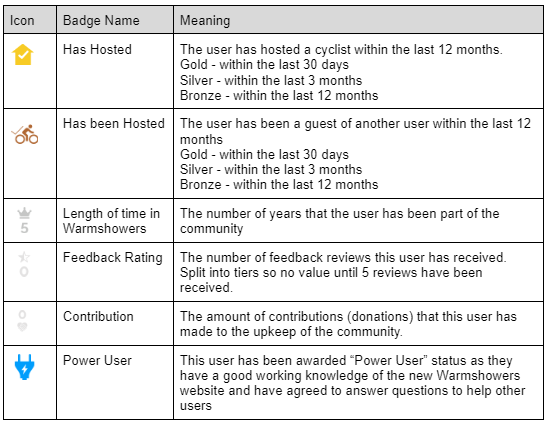
The setting of your badges is recalculated once every 24 hours.
Use the Password Recovery link at the bottom of the website homepage to reset your password.
Start by resetting your password using the Password Recovery link at the bottom of the website homepage. Be sure you are using the same email address you used when you created your account. If that doesn’t work, please go to www.Warmshowers.org/contact to report your issue using as much detail as possible
Start by resetting your password using the Password Recovery link at the bottom of the website homepage. Be sure you are using the same email address you used when you created your account. If that doesn’t work, please go to www.Warmshowers.org/contact to report your issue using as much detail as possible.
Our mobile app has a free Host-Only mode, allowing you to respond to messages and hosting requests without purchasing an app subscription. Download the app from the app store and click the “Continue as a Host” button on the Purchase Subscription popup. (Note: you must be a paid Warmshowers user to access the free Host-Only app mode.)
You can use your Warmshowers app on multiple devices in Host Only mode without requiring a subscription for each device.
Your app subscription is managed and renewed by the App Store you purchased it from (Google Play for Android devices and the Apple App Store for iOS devices).
In order to access your Warmshowers account in "Touring mode" to find hosts, your app needs to be able to verify your subscription with the app store. This means that your new device needs to be logged into the appropriate app store with the account used to purchase the subscription. It is not possible currently to use a subscription purchased using an Android device, on an Apple device , or vice versa.
Our new website is built to work on all major web browsers. This includes Google Chrome, Microsoft Edge, Mozilla Firefox & Apple Safari. Other browsers may limit the ability to fully use this websites features.
If you've hosted a guest, or been hosted yourself, it is expected that you will leave feedback on the users profile to share your experience. Feedback is a vital part of informing hosts and guests of the experiences others have enjoyed with an individual, and should always be factually accurate and honest.
Positive feedback is great, but if things weren't quite as you expected please consider carefully whether this came about deliberately, or whether there were other factors such as unexpected situation changes, miscommunication, or simply differences in cultural etiquette. If you are genuinely unhappy with a hosting experience, indicate this in your feedback and our team do follow up on all negative feedback comments.
Warmshowers requires new users to pay a one-off registration fee of $30 which goes towards the cost of operating the Warmshowers platform.
As a host, once you have paid your registration fee, you can use the website or the app without further charge to manage your profile, the hosting you can offer, and respond to hosting requests from Warmshowers cycle tourists. If in the future you decide to tour yourself, then you can use the website for free to find and arrange accommodation with other hosts, or you can purchase a subscription for the Warmshowers app and use the App to find and arrange accommodation.
Warmshowers requires all new users to pay a one-time registration fee of $30 USD which goes towards the cost of operating the Warmshowers.org platform.
The registration fee was introduced for new users, to try to ensure that people joining the community were committed to both touring and hosting.
As a host, once you have paid your registration fee you can use the website or the app without further charge to manage your profile, the type of accommodations you can offer, and respond to hosting requests from Warmshowers cycle tourists.
If in the future you decide to tour yourself, then you can use the website for free to find and arrange accommodation with other hosts, or you can purchase a subscription for the Warmshowers app and use the App to find and arrange accommodation.
If you don't have a credit card, you could try downloading the Warmshowers app for your mobile device from the Google Play store or Apple App store to register and have payment made via your app store account.
The app is normally available on a subscription basis which you can choose to pay as either a monthly or an annual subscription. If you joined Warmshowers more than a month ago, your free trial period for the app has now ended and to use the app as a cyclist you need to choose a subscription.
You can access Warmshowers for free via the website or you can use the app for free in Host Only mode to manage your incoming hosting requests from other users.
All revenue from the app goes to fund support and further development of both the app and the website to improve capabilities for the Warmshowers community.
Your app subscription is managed and renewed by the app store you purchased it from (Google Play for Android devices and the Apple App Store for iOS devices).
To cancel your subscription you need to use your device to access your app store account.
On iOS devices go to Settings > AppleID and choose Subscriptions
This will show a list of your current and expired subscriptions. Touch the Warmshowers subscription and you should be able to cancel it.
On Android open the Google Play app, then touch your profile icon (in the top search bar).
Touch Payment and subscriptions, then choose Subscriptions. You should see the Warmshowers subscription listed and if you touch it you should see the details of the subscription together with the option to cancel it.
Alternatively, you can use the "Manage Subscription" option from the menu within the Warmshowers app, which will take you to the correct location on your device to allow you to cancel the subscription.
Warmshowers is enrolled in most donation and matched-donation programs within the United States.
Our EIN is 46-1370418.
Warmshowers is founded on the principal of reciprocity — hosts offer what they can, in the expectation that when they are touring themselves, they will be able to enjoy the hospitality of other Warmshowers hosts. Hence, we do not allow hosts to charge their guests, and we remove hosts who are found to be doing so.
Cyclists looking for accommodation will contact you by sending a hosting request. This will appear in your messages inbox, and as an email notification to the email address associated with your profile. If you are using the Warmshowers app, you will also get a notification message directly to your device telling you you have a new message.
If you are not receiving email notifications, please check your junk email filter settings and spam folders to see if you need to whitelist our email account ([email protected]).
After you have created your Warmshowers account, you can search by host name (if you know who you are looking for) or by location (country, town, province, etc) then go to the selected host profile to request a stay.
Please read the host’s profile for any special requests and use the contact button to send them a message.
If the map shows clusters, zoom in.
Please note: the drop-down search menu will allow you to see hosts in that area.
Warmshowers is an organisation of touring cyclists and community members who provide hosting (accommodation and use of amenities) to touring cyclists.
Hosts would expect that you are cycle-touring.
Hence it is not appropriate to use the Warmshowers hosting community when you're travelling by other means.


